# How to Create a Reusable LocalStorage Hook
## Hello World 👋
Hooks are special types of functions in React that you can call inside React functional components. They let you store data, add interactivity, and perform some actions, otherwise known as side-effects.
The most common hooks are:
- useState
- useEffect
- useRef
- useContext
- useReducer
In the previous article ([React Hooks: Managing State With useState Hook](https://blog.bhanuteja.dev/react-hooks-managing-state-with-usestate-hook)), we learned about `useState` hook. We will be using the `useState` hook in this article, so if you haven't read the previous one yet, please go and read that before going through this. In this article, we will learn about `useEffect` hook and then later use it to build a custom and reusable localStorage hook.
## useEffect
`useEffect` is a built-in function in React. It takes a callback function as an argument and does not return anything.
For example,
```js
useEffect(() => {
//...do something here
})
```
**Note:**
- React runs the callback present in `useEffect` after every render and rerender of the component.
## Creating a reusable LocalStorage Hook
### Simple useEffect
Let's take a simple `counter` example as shown below.
```js
function Counter() {
const [count, setCount] = useState(0);
const incrementCount = () => {
setCount(count + 1);
};
return ;
}
```
%[https://codesandbox.io/s/use-effect-simple-counter-sdyy9]
Try to increment the counter in the above sandbox and reload the sandbox page. You will see that as soon as you reload the page, the counter is reset to 0. Let's say that we don't want that. We want the counter to stay at the same value even after you reload the sandbox page. One way to do this is to store the value of the counter in local storage and sync the counter state from there when you reload.
Let's see how we can achieve that using `useEffect`.
```js
useEffect(() => {
localStorage.setItem('count', count)
})
```
What this does is, every time the component rerenders, it updates the value of the `count` key in local storage.
```js
function Counter() {
const [count, setCount] = useState(0);
const incrementCount = () => {
setCount(count + 1);
};
useEffect(() => {
localStorage.setItem('count', count)
})
return ;
}
```
%[https://codesandbox.io/s/use-effect-1-2s34t]
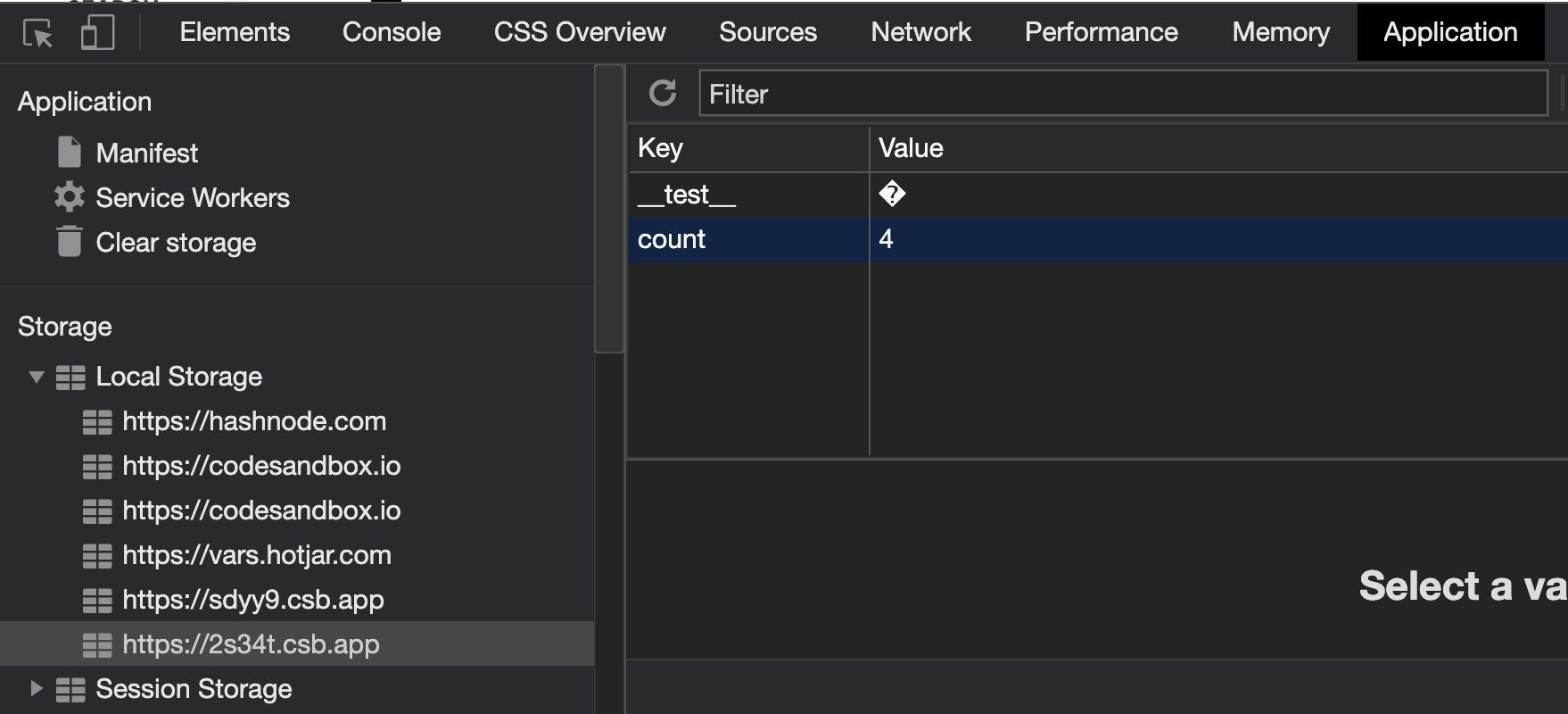
As you increase the count, you will see that the count in localStorage is getting increased. But as soon as you realod the page, the count is being reset to 0 again, even in localStorage. This is because we are not getting the initial value of `count` from localStorage.
Let's change the component to get the initial value from localstorage.
```js
function Counter() {
const [count, setCount] = useState(() => localStorage.getItem('count') || 0);
const incrementCount = () => {
setCount(count + 1);
};
useEffect(() => {
localStorage.setItem('count', count)
})
return ;
}
```
**Note:**
Here we are doing a [lazy initialization](https://blog.bhanuteja.dev/react-hooks-managing-state-with-usestate-hook#lazy-initialization) of the state.
%[https://codesandbox.io/s/use-effect-2-kefrj]
Try to increment the count and reload the sandbox. You will see that the counter no longer resets to 0. But, we are facing a new problem.
To reproduce the problem,
- Increment the count a few times.
- Reload the page.
- Now increment the count again by clicking the count button.
- You will see that instead of incrementing the count by 1, one is getting concatenated to the existing count.
This is happening because of how localStorage stores the values. It stores everything in the form of a string. So even when we try to store the number in localStorage, it converts it into a string and then stores it. So, when we fetch the value from localStorage, we are getting a string instead of a number. That is why incrementing the count is not behaving as it should.
Let's try to fix this.
```js
function convertNumberToString(num) {
return `${num}`
}
function convertStringToNumber(str) {
return Number(str)
}
function getInitialValue() {
const localStorageValue = localStorage.getItem('count')
// here we are converting the string in localStorage to number before returning
return convertStringToNumber(localStorageValue) || 0
}
function Counter() {
const [count, setCount] = useState(() => getInitialValue());
const incrementCount = () => {
setCount(count + 1);
};
useEffect(() => {
// we are converting the number to string before storing in localStorage
// This way, we can control how the conversion happens
localStorage.setItem('count', convertNumberToString(count))
})
return ;
}
```
%[https://codesandbox.io/s/use-effect-3-rlp43]
Now, everything seems to work. But, we can optimize this even further.
### Dependency Array
Let's try to add a console log in the useEffect and see when it is being run.
```js
useEffect(() => {
console.log('useEffect callback is getting executed')
localStorage.setItem('count', convertNumberToString(count))
})
```
%[https://codesandbox.io/s/use-effect-4-s85vu]
You will see that the `useEffect` callback is getting executed every time the component re-renders. Try to click on "UPDATE SOME OTHER STATE" button. You will see that even though the count doesn't change, the `useEffect` is getting called. This is the expected behavior. But we want to set the value in localStorage only when the value of count changes.
React gives us a way to achieve this.
`useEffect` takes an array as the second argument. It is called `dependency array`. You can specify all the dependencies that your `useEffect` depends on, in that array. And that `useEffect` callback will only run when any of those dependencies change.
For example, we want the `useEffect` in our example to run only when count changes. You can achieve this as follows.
```js
useEffect(() => {
console.log('useEffect callback is getting executed')
localStorage.setItem('count', convertNumberToString(count))
}, [count])
```
%[https://codesandbox.io/s/use-effect-5-ek9bf?file=/src/Counter.js]
Now, when you try to click on "UPDATE SOME OTHER STATE", the component rerenders, but the `useEffect` callback will not get executed.
Let's put everything together.
```js
import React, { useState, useEffect } from "react";
function convertNumberToString(num) {
return `${num}`;
}
function convertStringToNumber(str) {
return Number(str);
}
function getInitialValue() {
const localStorageValue = localStorage.getItem("count");
return convertStringToNumber(localStorageValue) || 0;
}
function Counter() {
const [count, setCount] = useState(() => getInitialValue());
const incrementCount = () => {
setCount(count + 1);
};
useEffect(() => {
localStorage.setItem("count", convertNumberToString(count));
}, [count]);
return (
);
}
export default Counter;
```
## Creating a reusable hook
> The `useLocalStorageState` hook example shown here is based on the example from [Kent C. Dodds](https://kentcdodds.com)'s [EpicReact.Dev](https://epicreact.dev) `React Hooks` workshop.
Since we may need the same logic of storing state in localStorage at many places, we can create a custom hook that does it, and then we can use it wherever we want to store the state in localStorage.
```js
function convertNumberToString(num) {
return `${num}`;
}
function convertStringToNumber(str) {
return Number(str);
}
function getInitialValue() {
const localStorageValue = localStorage.getItem("count");
return convertStringToNumber(localStorageValue) || 0;
}
function useLocalStorageState() {
const [count, setCount] = useState(() => getInitialValue());
const incrementCount = () => {
setCount(count + 1);
};
useEffect(() => {
localStorage.setItem("count", convertNumberToString(count));
}, [count]);
return [count, setCount]
}
```
This is what we have until now. Let's refactor this a bit to generalize things.
```js
function getInitialValue(key, defaultValue, convertFromString) {
const localStorageValue = localStorage.getItem(key);
return convertFromString(localStorageValue) || defaultValue;
}
function useLocalStorageState(
key,
defaultValue = "",
{ convertToString = JSON.stringify, convertFromString = JSON.parse } = {}
) {
const [state, setState] = useState(() =>
getInitialValue(key, defaultValue, convertFromString)
);
useEffect(() => {
localStorage.setItem(key, convertToString(state));
}, [key, state, convertToString]);
return [state, setState];
}
```
**What did we do here?**
- We changed the variable `count` and `setCount` to `state` and `setState`
- We are asking the user to provide the `key` as an argument. We will store the state in this key in localStorage.
- We are asking the user to also pass the initial default value as an argument. Previously in our example, it was 0.
- We are asking the user to optionally pass the `convertToString` and `convertFromString` functions as arguments.
- If the user doesn't provide them, we are defaulting them to `JSON.stringify` and `JSON.parse`.
- We updated the dependency array of `useEffect` and added all of its dependents.
- Finally, we are returning `state` and `useState` in the form of an array, similar to how the inbuilt `useState` hook returns an array.
Let's change our example to use this custom hook.
```js
function Counter() {
const [count, setCount] = useLocalStorageHook('count', 0);
const incrementCount = () => {
setCount(count + 1);
};
return (
);
}
```
We can go a bit further and allow the user to also pass a function as the initial value, similar to how useState works.
```js
function getInitialValue(key, defaultValue, convertFromString) {
const localStorageValue = localStorage.getItem(key);
// change starts here
if(localStorageValue) {
return convertFromString(localStorageValue)
}
return typeof defaultValue === 'function' ? defaultValue() : defaultValue
// change ends here
}
```
Sometimes, the `convertFromString` function can throw an error when the value against the given key already exists in the local storage. In that case, we can remove the corresponding key-value pair from local storage before adding it with new values.
```js
function getInitialValue(key, defaultValue, convertFromString) {
const localStorageValue = localStorage.getItem(key);
if(localStorageValue) {
// change starts here
try {
return convertFromString(localStorageValue)
} catch {
localStorage.removeItem(key)
}
// change ends here
}
return typeof defaultValue === 'function' ? defaultValue() : defaultValue
}
```
Let's put everything together.
```js
function getInitialValue(key, defaultValue, convertFromString) {
const localStorageValue = localStorage.getItem(key);
if(localStorageValue) {
try {
return convertFromString(localStorageValue)
} catch {
localStorage.removeItem(key)
}
}
return typeof defaultValue === 'function' ? defaultValue() : defaultValue
}
function useLocalStorageState(
key,
defaultValue = "",
{ convertToString = JSON.stringify, convertFromString = JSON.parse } = {}
) {
const [state, setState] = useState(() =>
getInitialValue(key, defaultValue, convertFromString)
);
useEffect(() => {
localStorage.setItem(key, convertToString(state));
}, [key, state, convertToString]);
return [state, setState];
}
```
That's it. You can use this hook whenever you want to store the state in localStorage and keep it in sync with the actual state. The API is also very similar to how you use `useState`
```js
const [state, setState] = useLocalStorageState('state', {})
```
## What have you learned?
- useEffect hook
- It runs every time the component renders and re-renders when no dependency array is passed.
- You can pass a dependency array as a second argument.
- Callback in `useEffect` only runs when any of the value in the dependency array changes.
- If you pass an empty array as a dependency array, then the callback will only run after the component is first rendered.
- We also learned how to create a reusable localStorage hook using `useState` and `useEffect`.
## What's Next?
In the next article, we will see the flow of hooks. We will see exactly at what time different hooks will be run in the component lifecycle especially `useState` and `useEffect`.
#### Until Next Time 👋
---
### References:
- [EpicReact.Dev](https://epicreact.dev) by [Kent C. Dodds](https://kentcdodds.com)
- [React Hooks Workshop Prod Deployment](http://react-hooks.netlify.app/)
- [React Hooks Workshop Repo](https://github.com/kentcdodds/react-hooks)
---
If this was helpful to you, Please **Like** and **Share** so that it reaches others as well. To get email notifications on my latest articles, please subscribe to [my blog](https://blog.bhanuteja.dev) by hitting the **Subscribe** button at the top of the page. You can also follow me on Twitter [@pbteja1998](https://twitter.com/pbteja1998).
%%[newsletter]